As a team of hard workers, we know you need a break! So that you can fully unplug when you need to, here are the items to address when you’re out.
- If you are expecting to be out for an extended period of time (ex: new baby, vacation, etc.), add the information to your email signature so that all your clients are informed ahead of time (insert screenshot of the message)
- Set your auto responder with a message of the dates you will be out, who they can contact in the event of an emergency, and when they can expect a response from you.
Cover
- Identify a team member who will be covering your projects while you’re out.
- Set up a time to review projects and deadlines that will occur while you’re out with that team member.
- Make sure that they are set up on the necessary projects in Harvest and Asana to be able to properly handle all tasks that come in while you’re gone.
Slack
- Set your slack status to display for the dates that you are out and (if there’s space) until when
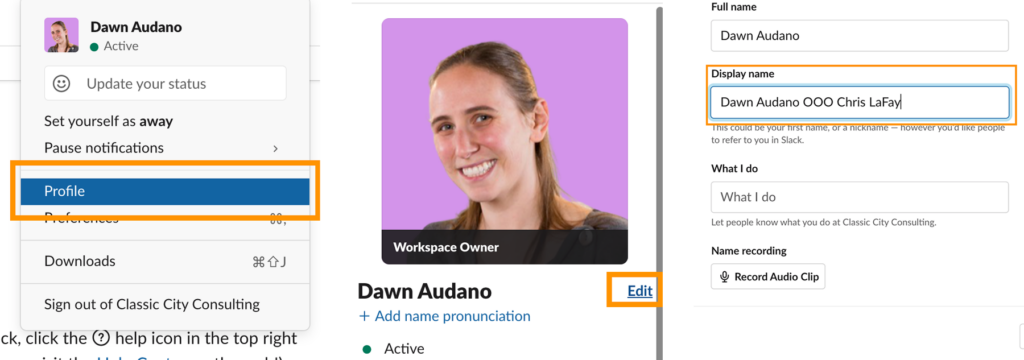
- Change your Display Name to Your Name OOO Covering Team Member. (ex: Chris LaFay OOO Dawn Audano). This way, people know who has been briefed and can address the question or concern.
- You can change your Slack Display name by clicking on your avatar and going to profile
- Selecting Edit
- Changing your Display Name
Google Calendar
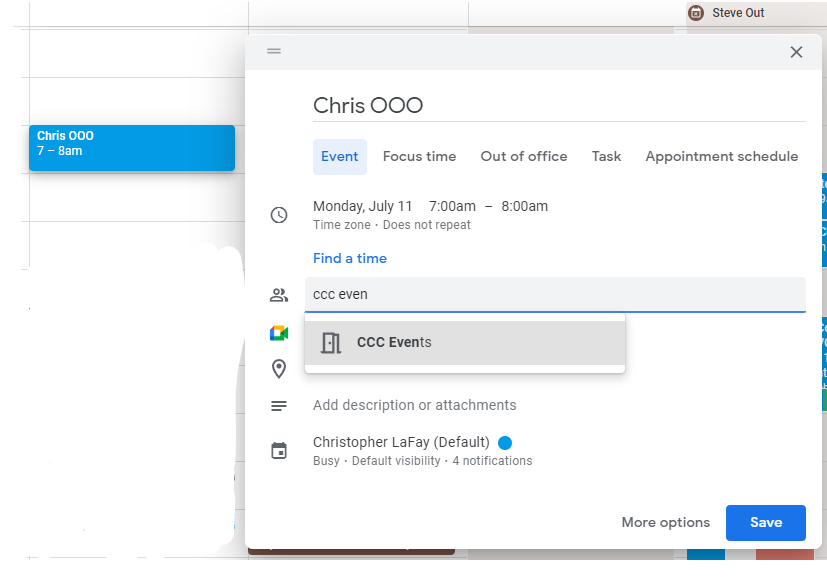
- Subscribe to the CCC Events Calendar
- Create a new event and invite CCC Events to it
- Title it: “Your Name” OOO (ie. Chris OOO)
- Have it recur as long as you will be gone
- Submit